Expat Life Survival Guide 1: Doing research

photo of man standing near high rise building
Photo by Ricardo Esquivel on Pexels.com

I recalled the ‘euphoria’ of landing the job – as an expat librarian in the Middle -East. I remembered sharing this with my wife, and she reminded me that it was kind of long overdue – apparently, she had wanted us to move abroad after getting married. Well, better late than never.

Back to the topic. Before making the BIG move, do your research, extensively. My wife even got on board to find more information about the place, the people, the climate, etc. Know what are the dos and don’ts of the area, the cultural aspect of the region – this includes social and work culture. Take note of the climate as well. (Get ready those skin cream if needed). It would also be worthwhile to know specific administrative rules, policies, and procedures: such as applying for the driving license, buying a car, registering kids to local/international schools, making that doctor’s appointment for health check-ups, etc. The information obtained will help you and your family prepare your mindset so that you and your family won’t come in ‘blindly’ and get a ‘rude shock.’

Don’t forget to reach out and network to those who had been there and done that. For me, I was fortunate to re-connect with a friend who was working in the region at that time. I conducted an informal ‘reference interview’ with the person. It was a fruitful session. There were surprising answers to questions which I thought are quite straightforward. One of the most important lessons that I learned was to ensure that before you sign on that dotted line, make sure that these 3 things (among others) are covered for you and your family: medical coverage, housing or housing allowance, and your children’s education.

Here’s a quick list of information sources that I’ve used:

  • Human expertise
  • Books esp “How to” guides
  • Magazines / Journals
  • Travel Guides
  • Social Media such as Blogs, Twitters, Facebook
  • Websites – Governmental websites
  • Newspapers

See how easy it is to keep track of things

In my line of work, there are just too many things to keep track.  Among them are meetings, project datelines, notes, troubleshooting issues, expiration dates of e-resources, renewal dates, license agreements, metadata issues, access questions, ebook/e-journal requests,   … the list keeps going on.

How do I keep track of all these?  One of the first methods that I used was noting down in a little notebook followed by pasting 3M post-its on my table, computer screens, coffee mugs … and anything else that I can use to stick those post-its.  I would not say that writing down and post-its are not productive/efficient.  They do. But as the list keeps growing at an alarming rate, I realized that I needed something more dynamic and robust to keep track the various projects, tasks routines as well as other miscellaneous stuff.

I tried to use different notebooks for various projects, daily routines and the like but it would be too troublesome and I could build a big library keeping all those notebooks. (I’d rather keep one journal to note down the daily happenings in my life).  I needed something that could allow me to see everything on one page at a single glance.   That’s when I discovered the following 3 cloud services while trawling the internet for answers.

  • Evernote
    evernote

    How this tool has helped me:

    • Keep all my critical notes by different category.  I can easily organize all my notes under different headers.   For example, I could slot several notes on electronic resources such as important IP ranges, Proxy information, useful tips and so forth under Electronic Resources.
    • Organize all my ideas, thoughts and suggestions in a single place.  These items could be stuff to write about any potential conference(s), training topics, improving workflows/procedures or even paper for submission to journal(s).
    • Import any significant Outlook emails into Evernote for future references.  So instead of searching/browsing those emails in Outlook, I can extract them into Evernote and save them under different headings.
    • Keep interesting presentation slides and make side notes on them.
    • Clip interesting articles on the Internet and convert them into Evernote notes.  I can then read these articles at a later time.
    • More info can be found here.
  • Trello
    trello

    (I got to know this while on a study visit to Duke University. I met the Head of the Acquisitions team who showed me how easy it was to track their purchases using Trello).  How this tool has helped me:

    • Organize different tasks for separate projects under one roof.  I can create multiple ‘boards’ to store various functions.  I can then monitor the progress of each of these tasks.
    • Control tasks that I have delegated to other team members.  I can track and check if there is a backlog.
    • Attaching file from DropBox or other places to the task(s) that I have created.  In this way, I do not have to toggle the different apps while looking for some information.
    • Create checklists and due dates for various tasks.
    • Import Outlook emails and embed them into a task.
    • Check this site for a tour of Trello.
  • DropBox
    dropbox

    • Save my documents (pdf, ppt, doc, Xls and much more) in the cloud.  I can retrieve them later wherever I am (need Internet connection).
    • Save the space on my laptop/desktop
    • Access on different mobile devices.
    • Info on Dropbox.

What about you? What tool(s) work for you and what doesn’t?

Managing tasks with ‘disruptive’ technology

This may sound cliche: I am swamped with project work, routine tasks, meetings, supervision work…and the list goes on.  I have tried a number of methods: from pen and paper, MS Outlook folder and other productivity tools to help me keep track of stuff.  One such tool that has helped me so far is Trello.

There are a number of Trello features that contribute to this.  Here’s one of Trello’s feature: (Oh for those who would like to know more about Trello, here’s a link to guide you.)

Delegate a task via email and with the help of Trello, get it ‘pushed’ into your ToDo Board.

Here’s how my Trello board looks like:

trelloboards

Suppose if I need to email and delegate a task to another staff, I’ll open MS OutLook and begin writing the email.  Once completed, here’s what I do:

  1. Open my Trello ToDo board. Locate the Show Menu (somewhere near the top right of the screen) and click on it.
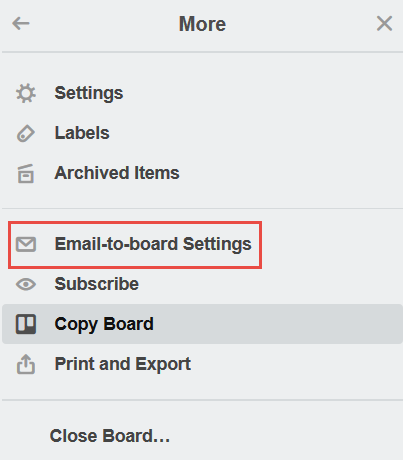
  2. Click More and “Email-to-board” settings.
    trellomore
  3. Ensure the Cards appear in the correct Column:
    trellocol
  4. Copy and paste the “Email Address for Board” into your BCC field of the email.
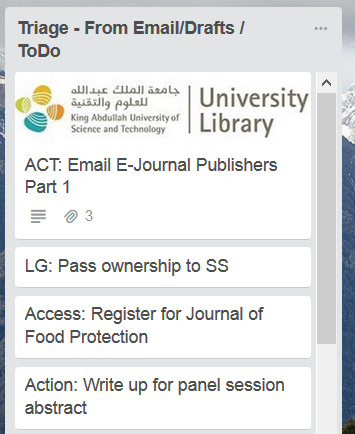
  5. If successfully executed, the email should appear under the correct column.
    trellotriage

Hope this simple stuff helps.

Useful Links: