Usability Study: Interviews with our community

Interview

One of my projects for this year is to conduct Summon After-Implementation study.  Summon is our new web discovery layer which was implemented in May 2016.  This study involved interviewing our community namely: Faculty members, PhD and MSc students and PostDoc.  One of the main objectives of this interview exercise is to obtain information on how they are using Summon to search for electronic resources.  In addition to that, I asked for their recommendations on improving their search experience.

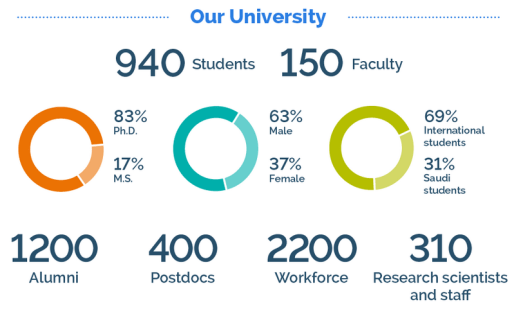
Quick Information about our International Graduate Research University:

KAUSTFact

Source:  https://www.kaust.edu.sa/en/about/media-relations#part3

Here are some quick takes:

  • Google Scholar is the go-to source for articles.  According to the participants, they obtain more relevant and faster (search return speed) hits compared to using Summon
  • Most of the participants searched for articles as compared to ebook / ebook chapters when using Summon
  • Use Summon to search for library’s print or electronic books collection.  An interesting comment: Google Scholar is not efficient enough to provide this information for them.  ** Imagine if Google Scholar is able to do this 🙂
  • Participants found that the search results in Summon are often too cluttered; giving rise to information overload.  Most of them are also unaware of the filter features that allow participants to filter out the ‘noise’ from their search results.
  • The search result return speed is another cause for concern (Summon).  Perhaps a more directed search approach would assist our users to get their information faster.  We could have tab / radio button options on our website to allow our users to search for articles; ebook / ebook chapters and print / AV materials separately.
  • Though some of the participants mentioned that they have attended our library training, there is not much evidence whether this has impacted their search experience in Summon.  (Another potential research topic 🙂 ).

Those are just some of the main points garnered from the interviews.  Any peeps out there willing to share their experience?

Managing user questions using cloud services: KAUST library experience

iMacMy paper for the previous Special Libraries Association / Arabian Gulf Chapter (SLA / AGC) 2017 has been uploaded to our university library’s repository.  Here’s the link to the full paper.  It (paper) outlined the tasks undertaken to implement our virtual reference tool (LibAnswers) as well as the challenges faced.

One of the benefits that we reaped after implementing this:

  • Eliminate chaos in tracking, replying and monitoring all questions coming via email / online forms
  • Better statistics management
  • Tagging feature
  • Public-Facing FAQ website for our users

Moving forward, we are taking a look at implementing the Ref Analytics feature.

Life as an E-Resources Librarian in an International Graduate Research University based in Saudi Arabia

Disclaimer: The following is my own personal account as a Singaporean Expat living in Saudi and may be different for others (usually based on their country’s passport *wink*).  I have been working in the library field for close to 20 years.

Before proceeding further, I’d like to thank my wife for sharing this journey with me and being my pillar of strength when the going gets tough.  Moving from a first world country,  you will need to have the crucial qualities such as patience, perseveranceresilience and a Can-Do / Never Say Die spirit.  Why those traits?  From my experience here, I’ve encountered many challenges and obstacles along the way that if you don’t possess at least one of those, you’ll probably just let everything go and leave.  You need to have an open mind.  Turn challenges into opportunities.  Like Denzel Washington said “Fall Forward“.  Understanding and respecting local cultures and communication norms would be very advantageous as well.

It began with Access and Digital Services Specialist which later turned out to be Electronic Resources Specialist.  The ride was initially bumpy filled with sweat, tears of joy/sadness against a backdrop of a dynamic work landscape.  Fast forward 7 years later, I won’t trade the valuable experience for anything less.  Life is full of tests and tribulations but in it, are lessons that money can’t buy.

I moved from Singapore to join a newly established Graduate Research university library based in the Kingdom of Saudi Arabia way back in late 2009.  I remembered the first time I stepped into the library; and bumped into the then library director, Joe Branin.  He was a warm, cordial and knowledgeable man; full of advice.  He made me feel at ‘home’ in my new surroundings. The very first Uni Librarian has since passed on. RIP Joe. You made every obstacle into an opportunity as reflected in the saying “What the caterpillar calls the end of the world, the master calls a butterfly.”   Richard Bach, (Illusions)

Being the Electronic Resources guy, I had the chance to work with various equipment: the main ones are: iMac, MacBook and my trusty iPhone – all provided by the university.  I ‘expanded’ that equipment to include IoS and Android devices.  Such is the support that I got over here.  One of the reasons why I got all those stuff is that I need to ensure that our e-resources work / behave well on all computers as well as mobile devices whether Windows, Mac, iOs and Android.  I get ‘fan-mail’ every once in a while when one of the e-resource titles don’t perform to expectation.

One of the things that you need to understand is to learn about the norms and work culture over here especially when locals are involved.  Working in a multi-cultural team is sometimes perplexing and needs adjustments at many levels in terms of expectations and understanding the knowledge and expertise of each team members.  Sometimes, a staff may be at a disadvantage due to his/her ‘indispensable’ status in a department especially  when he /she is so used to multi-tasking in their country of origin.

For example,  a staff who is good at his or her work may be held back in the trenches.  The Boss may feel that by having this individual around would be useful in getting the job done and done well where other staff fail(s) to deliver.  On top of that, the individual may be asked to ‘mentor’ other group members as they are not apt in their area of work.  This may be good for the Boss but not for that individual who will have to put in ‘double or triple shifts’.

Like most universities, this place is a flat organization.  Perhaps, any dissatisfaction with regards to promotions is quelled by trips abroad for conferences,  international paper presentations and of course not to mention the most important deciding factor is the remuneration perks.

To excel as an E-Resources Librarian, you need the key professional competencies as outlined by NASIG:

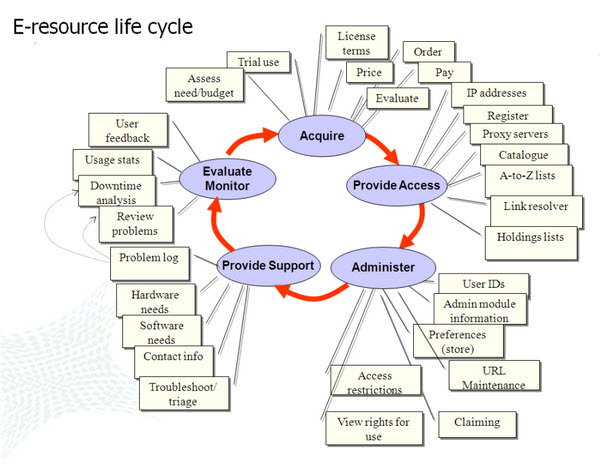
Life cycle of electronic resources:
erm_pesch2009
(Pesch, 2009)

You need to have knowledge on this.  I picked it up on the go over here.  Because of my background in Reference work and Web usability, the learning curve was gradual. Being in the electronic resources field also meant that I need to keep abreast of any technology changes.  I also have to be alert and stay on top of things (work-wise) so that they don’t fall thru the cracks.  In terms of “sharpening the saw”, I was fortunate that the library is supportive in my trainings which included attending a number of overseas conference(s). On top of that, I immersed myself in the numerous literature available on the subject matter.  Till today, I am still learning and would continue to learn.  At times, you will need to learn, unlearn and relearn.  You have to be honest with yourself.  It’s OK to admit not knowing some stuff on electronic resources management.  Take steps to address this by attending webinars, asking peers, read some books on the subject matter and so forth.

Last but not least, you sincerely want to make the organization that you work in to be successful and not just mediocre when compared to international standards. To achieve this reality and not just a mere figment of our imagination, everybody’s efforts and contribution counts regardless whether they are locals or expats.  After all, most of us are motivated to work and aim to ensure that the workplace would be successful and stand shoulder to shoulder with our peer universities.  However, the practice of promoting duds; those who do not have the RELEVANT expertise or experience should be stopped as such negativity would only slow down or worse impede , the vision of any university and bring down the morale of those who are passionate and good in their work.
Stats here, Stats there, Stats everywhere

World setting statistics I decided to take a break from ERM for a few hours today.  Something caught my eye: our Google Analytics statistics for the library’s website, our Summon (discovery service) usage reports, 360 statistics (AZ management system: EBooks and EJournals, Databases) and LibGuides / LibAnswers.

Some background:
Google Analytics gives us insight on how users are interacting with our website. We can get information such as:

  • number of page views
  • number of unique page views
  • average time spent on a page/screen / or set of screens
  • bounce rate:  each time a person leave your site without interacting with it
  • new and returning visitors
  • Browser and Operating system used
  • Mobile statistics such as desktop, mobile and tablet used
  • Users demographics: age and gender
  • and many more

Summon (Discovery layer)  stats provide:

  • Visitor Profiles:
    • Referring Source
    • Geo Location
    • Geo Map Overlay
    • Network Location
    • Domains
  • Technical Profiles
    • Browser
    • Platform
    • Browser and Platform combos
    • Connection Speed
  • Top Queries

Taken from Summon Knowledge Center

360 Usage Statistics provide:

  • Click-Through: A variety of views into the number of times users click on article, journal, ebook, and database links in ProQuest discovery tools.
  • Search and Browse: Shows what types of searches your users are conducting (for example, Title Contains and ISSN Equals) and what subjects they are browsing within ProQuest discovery tools.
  • 360 Link Usage: Reports about where your 360 Link users are starting their research, and how much use 360 Link is getting.
  • 360 Search Usage: Shows the amount of 360 Search federated search sessions and searches.

(Taken from 360 Core and Intota knowledge center)

LibGuides provide statistics on

  • libguide homepage tracking (daily and monthly basis)
  • detailed statistics for all libguides
  • session tracking
  • browser / OS tracking
  • search term tracking
  • assets
  • content summary

(Taken from LibGuide Dashboard)

LibAnswers also provide statistics on

  • general statistics on inquiries
  • FAQs
  • turnaround time

among others.  (Taken from LibAnswers Dashboard).

From all those stats, I started to wonder:

  • What does the term/keyword entered by users into the various access points mean?
  • If a certain keyword/term appears constantly, is it pointing to a lack of information? or lack of awareness of an existing service?
  • Can we improve our library homepage usability when the bounce rates are high?

There are more than just the ones listed above.

How can all these stats influence the way we provide services to our library users – whether it’s an online service or a physical service.  After all, we are here to serve our users.

2016 top trends for acad libraries

BinocularsSource: https://flic.kr/p/bn9okg

Check out this article on top trends affecting academic libraries.  What are the trends? Excerpts from the article:

  • Research Data Services
  • Digital Scholarship
  • Collection assessment trends
  • ILS and content provider mergers
  • Evidence of learning
  • New directions for Info Literacy
  • Altmetrics
  • Emerging staff positions
  • OER – Open Educational Resources

Have our libraries move towards that direction?

Presenting@Library conferences in Gulf region

Communication Week's sketchnotehttps://flic.kr/p/noKt5w

I read an interesting article on Presenting at your first conference by Michelle DeAizpurua.  It appeared on International Librarians Network.  In her article, she gave several pointers on presenting at conferences:

  • start small
  • go local
  • take every opportunity
  • Don’t assume you have nothing to share

It got me thinking about own experience presenting at library conferences in the gulf region.  I’ve presented at 2 Special Library Association Arabian Gulf Chapter (SLA-AGC) conferences so far: Muscat, Oman 2011 and Doha, Qatar 2014.  Both brought back many beautiful memories of the people I met as well as the picturesque natural beauties of the countries.  Below are the links to my papers:

I’d like to share a few things (with regards to the conference / presentation):

  • Come prepared and be ready to make adjustments
    I won’t dwell on how to give presentations but if you have emailed your presentation slides, do also come with file back-ups in USBs, dropbox or external hard disk – just in case.
  • Do not miss the conference exhibition.  It’s an opportunity to network with other vendors and publishers.
  • Check out the pre-conference workshops: I have attended several and obtained valuable information from attending them. (esp on license agreements).
  • Explore the chance to collaborate with fellow librarians in the Gulf Region.  There are interesting research topics to work on.
  • Take the time to visit the local libraries and speak with fellow librarians.  Note that this would take prior planning as you will need to contact the libraries first.  Getting the opportunity to visit the libraries would provide valuable information to see firsthand of how things are done and provide insights on the similarities or differences between libraries.
  • Snap pictures; lots of them. (but obey the photo-taking regulations in the country).

Muscat, Oman 2011

Muscat, Oman 2011

And we have another ‘toy’

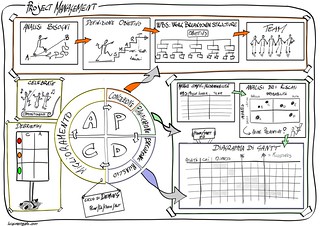
sketchnote project management
After months of research, communication, and discussion, our ERM (Electronic Resources Management) team finally got what we wanted …. a new ERM System (ERMS) to replace the obsolete one. Thank God.

We decided to go for Proquest 360 Resource Manager.  One of the advantages is that we are currently using 360 Core, 360 Marc Updates and Summon; all on the same platform and vendor.  Thus seamless integration.

Now that I have finished the recommendation report, I am planning the Implementation Phase of this ERMS. Exciting times.

The road ahead will be challenging and hopefully rewarding.  Given that we only have a small team with varied expertise level, there will be some learning curve (hopefully NOT a steep one).  Thinking back, it was interesting to note the technologies that we had used before in relation to ERM:

  • Innovative Millennium ERM > Replaced by Proquest 360 Resource Manager
  • CASE > Replaced by Proquest 360 Core
  • Encore > Replaced by Proquest Summon
  • MS Outlook > Complimenting the future ERMS
  • MS Sharepoint > Storage point

as well as the challenges that we faced.

I’m thankful and glad to have the opportunity of leading those projects listed above.

Stay tuned.

Managing tasks with ‘disruptive’ technology

This may sound cliche: I am swamped with project work, routine tasks, meetings, supervision work…and the list goes on.  I have tried a number of methods: from pen and paper, MS Outlook folder and other productivity tools to help me keep track of stuff.  One such tool that has helped me so far is Trello.

There are a number of Trello features that contribute to this.  Here’s one of Trello’s feature: (Oh for those who would like to know more about Trello, here’s a link to guide you.)

Delegate a task via email and with the help of Trello, get it ‘pushed’ into your ToDo Board.

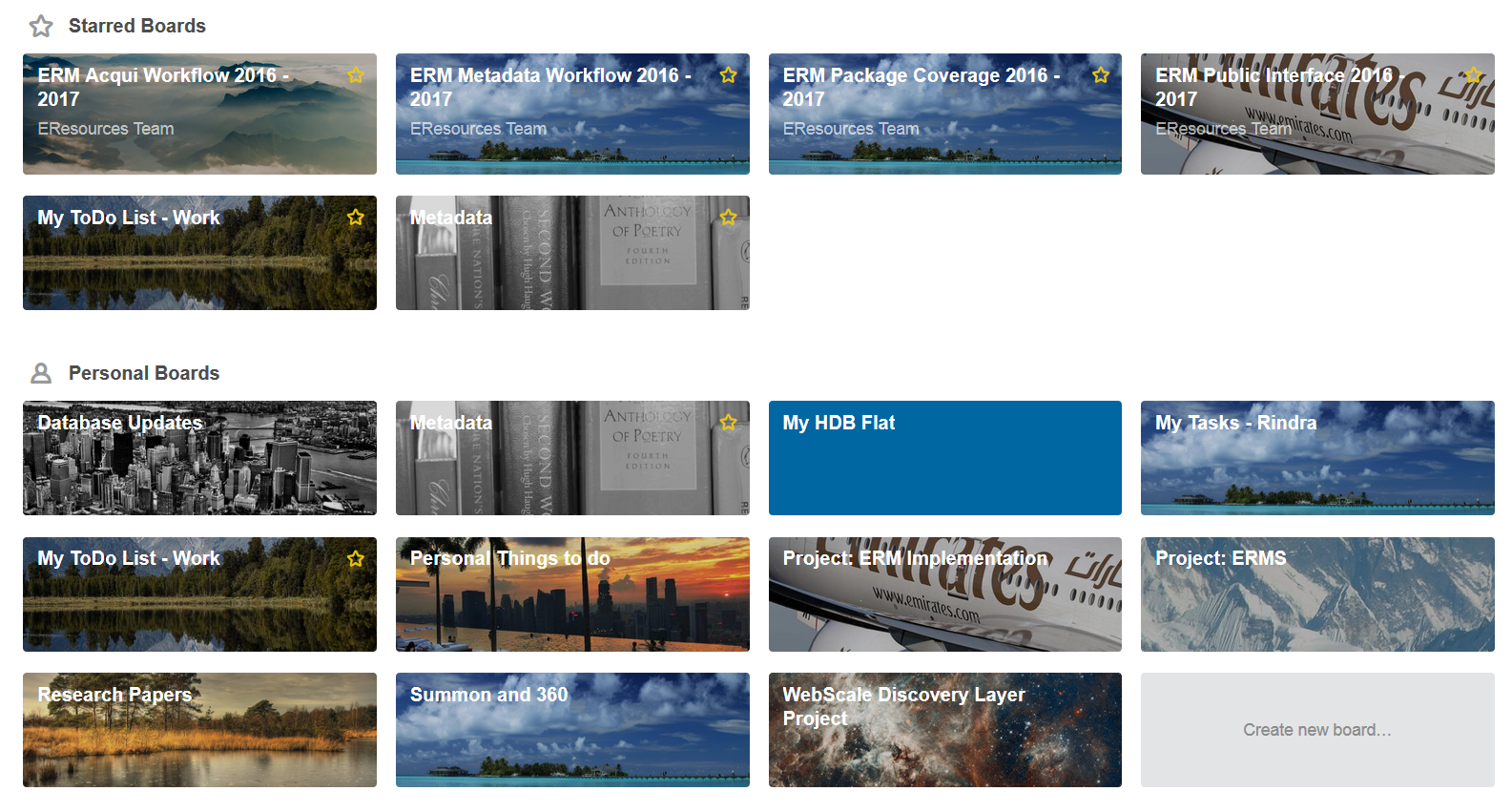
Here’s how my Trello board looks like:

trelloboards

Suppose if I need to email and delegate a task to another staff, I’ll open MS OutLook and begin writing the email.  Once completed, here’s what I do:

  1. Open my Trello ToDo board. Locate the Show Menu (somewhere near the top right of the screen) and click on it.
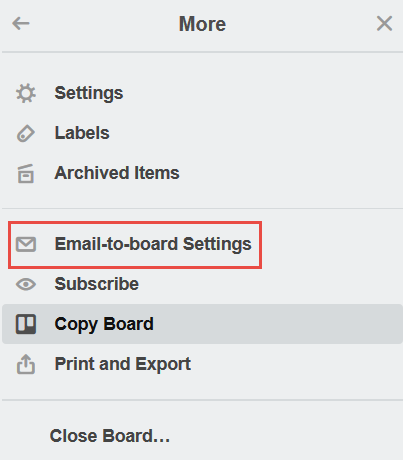
  2. Click More and “Email-to-board” settings.
    trellomore
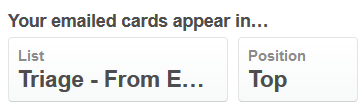
  3. Ensure the Cards appear in the correct Column:
    trellocol
  4. Copy and paste the “Email Address for Board” into your BCC field of the email.
  5. If successfully executed, the email should appear under the correct column.
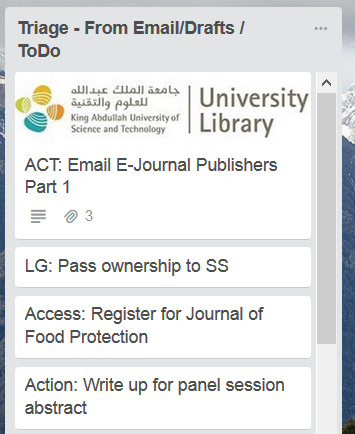
    trellotriage

Hope this simple stuff helps.

Useful Links:


Frozen in DC

I attended the Coalition for Networked Information (CNI) conference in Washington DC 2016. Stayed at Capital Hilton which was quite near the White House. Weather wise: Freezing cold but no snow.  Flight in was good with no delays.

Before the conference started, I had the chance to discover DC.  But due to time constraint, I only managed to walk to the White House and the nearby streets.  It was not like in 2010 ALA conference where I had the chance to visit the mall and the nearby Library of Congress.  One incident which I won’t forget is the hotel evacuation due to a fire incident sometime during 4 am.  It was freezing cold.  Had to stand with the others in the streets, watching the Fire Brigade or Battalion in action.  However, the hotel informed us that we could wait in the nearby hotel lobbies or chill@Starbucks.

Back to the conference stuff.  There was a bunch of interesting project briefings given by various universities.  The ones that I attended were:

  • Research Software Preservation/Sharing
  • Cost of Open Access: Pay it Forward
  • Scholars@Cornell: Visualizing Scholarly Record
  • Expanding Research Data Services
  • The Future of Finding at Oxford
  • Institutional Learning Analytics

Below are some of the CNI conference videos:

The Cost of Open Access to Journals: Pay It Forward Project Findings from CNI Video Channel on Vimeo.

Makerspaces, Virtual Reality, The Internet of Things at alia Stories from CNI Video Channel on Vimeo.

In the nutshell: It was my maiden conference for CNI.  I found it useful as there was a lot of takeaways as well as insights topics new to me.  Given my interests in Web Discovery and Virtual Reference, there were several briefings that caught my attention.  One of which was “The Future of Finding at Oxford”.  They have published their report online.  It’s very comprehensive, outlining their aims, objectives, project methodology and related matters.  (I am still reading this).

I also googled for previous CNI briefings in Youtube and discovered an interesting talk on Virtual Reference:

One more thing: I should have listened to my wife on bringing just a few clothes for the conference (I was there for about 4.5 days). The custom officers were looking at my ‘huge’ luggage and decided to take at look at it.  Out came the Nescafe coffee bottle, sugar sticks, 4 sweaters, biscuits and so forth.  Before clearing me, the officer commented that I should be well insulated during my stay there 🙂


What I have been up to….

Working

It had been a whirlwind period – Dec 2016 till Jan 2017.  I was not able to post due to lots of stuff that had taken place recently.  In the nutshell, here’s a quick overview:

  • Attended CNI (Coalition for Networked Information: CNI) conference in Washington DC in early Dec 2016.  One of the nights, me and the other hotel guests had to evacuate due to a fire. Spent more than an hour in the freezing chilly DC morning
    (4 am).
  • Flew back to Singapore to close the deal for our new home. Yes, as last, I got a house. (Alhamdulillah).
  • Down with flu for most of my vacation leave in Singapore Dec 2016 – Jan 2017.
  • 2017: Preparing for my panel session as well as paper session for SLA AGC 2017 inshaAllah
  • Completed the first phase of the electronic resources management system project, now leading the implementation phase.

Stay tuned for my upcoming posts.